[render_menu Professionnels]
[render_menu "Service client"]
[render_menu "En savoir plus"]
Learn how to personalize your Neviweb account
Learn how to personalize your Neviweb account
You can access your Neviweb account settings via the menu icon. located at the bottom right of your screen
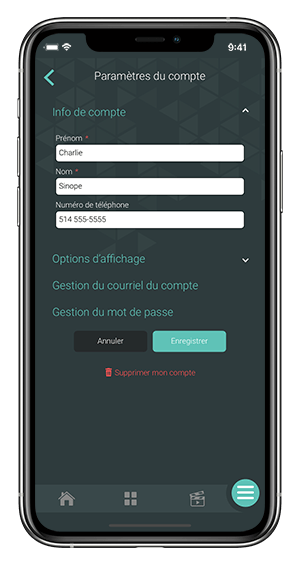
In this section you can modify your basic account information such as your first name, last name and phone number.
It is in this settings section that you can enable and disable the tooltip.
You can also change the size of the tiles, which can be very useful if you are using Neviweb on a tablet or in its web version with the neviweb.com website.
The temperature format displayed in Neviweb can also be selected. Note that you can choose a different display format for your thermostats by going to your device’s settings.
The tooltip provides explanatory text for each parameter available in Neviweb. A question mark appears in each field when this function is enabled.
Selecting the reading size and tiles
Selection of the language used in Neviweb and for communications
Selecting the time format in Neviweb and for communications
Temperature format displayed in Neviweb and for communications
In this section you will find the different platforms that are connected to your Neviweb account such as Google Home and Alexa, as well as links to articles helping you connect or remove platforms from your account.
Your Neviweb account management is directly linked to your email address.
If you change the email address in this section, the new email address will be used to identify you the next time you log in to your account.
You will also receive alerts for water leaks and low thermostat temperatures at this email address.
This is the section where you can change your account password.
You’ve forgotten your password. No worries! Follow these simple steps and you’re all set.
