[render_menu Professionnels]
[render_menu "Service client"]
[render_menu "En savoir plus"]
The dashboard is where you can quickly set your home's presence status, interact with your favorite devices or scenes, and access the tools section.
The dashboard is where you can quickly set your home's presence status, interact with your favorite devices or scenes, and access the tools section.
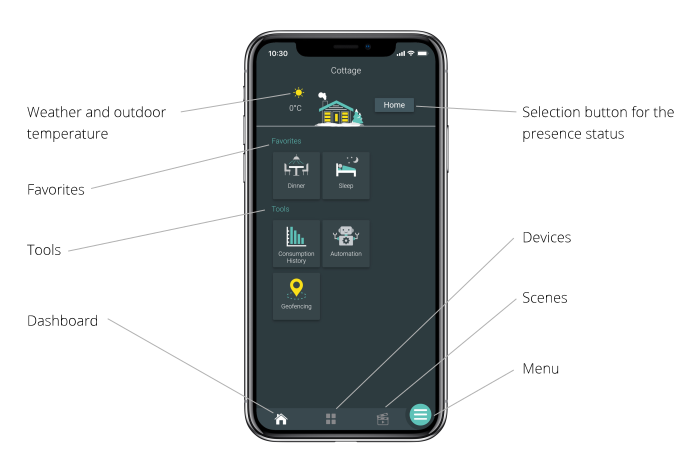

See the current weather and outside temperature at a glance

In addition to viewing the presence status of your home, this button allows you to activate pre-established actions using settings or scenes depending on your type of device.

The place to see all your favorite devices and scenes.

No matter where you are in Neviweb, tap this icon to return to the dashboard.

Here you will find all the devices installed in your location, which you can also view by room or by type of device.

Scenes allow you to trigger programming with your fingertips at the desired moment.

Quick access to your account settings, locations, tools, and support.

The location icon allows you to access the list of all your locations and to modify their settings.
Discover Neviweb’s practical tools
See your energy consumption for your entire location.
Allows you to program actions that are executed based on: time, sunrise/sunset, the action of a device and presence.
The place to activate and define the settings for the geofencing function.
