
Follow these steps to reset your smart water valve :
- Remove the valve cover by unscrewing the 4 screws using a flathead screwdriver.
- Press and hold the “A” and “B” buttons on the smart water valve simultaneously for approximately 15 seconds.
-
Check that the indicator lights are on. They should all be green, except for one which will appear orange.
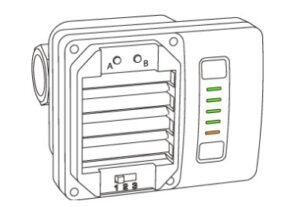
- The valve will close to the Close position to indicate that it has been successfully reset. If it is already in the Close position, it will remain closed.
- Once the valve has been reset, add it to the Sinopé Neviweb app.
If the reset does not appear to work, we invite you to contact the technical support team .
Product models associated with this article:
- VA4220WF, VA4220WF-M, VA4221WF, VA4221WF-M, VA4220ZB, VA4221ZB