
The thermostats for electric radiant floor heating and low voltage 24VAC (used for hydronic floors) are equipped with an output to control an auxiliary heating system. They therefore offer two temperature regulation modes: ambient mode and floor mode.
Ambient Mode
Ambient mode allows controlling the room temperature using the radiant floor heating, while respecting the minimum and maximum floor temperature limits.
If the floor temperature reaches one of these limits and the desired ambient temperature has not yet been reached, the auxiliary output activates the auxiliary heating device to reach the setpoint.
In this case, the auxiliary heating acts as a second stage of heating.
Floor Mode
Floor mode allows directly controlling the floor temperature.
In this mode, the thermostat maintains the floor temperature at the setpoint while respecting the maximum ambient temperature limit to prevent the room from becoming too warm.
To select your control mode and set the maximum and minimum setpoint limits, you must:
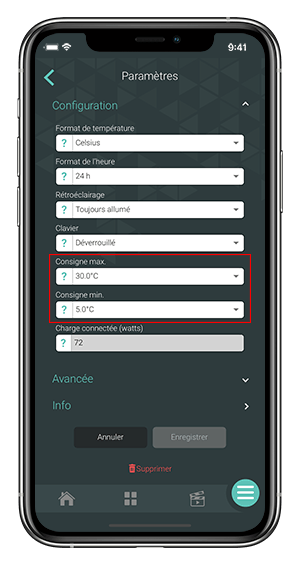
- From the Sinopé Neviweb app Dashboard, go to the All Devices page by tapping the middle icon at the bottom of the app.
- Tap the tile of the radiant floor thermostat, then click on the settings icon.
- Access the advanced device settings.
- Select the Ambient or Floor control mode.
- Set the minimum and maximum temperature limits using the dropdown menu. Save.
Product models associated with this article:
- (Wi-Fi) TH1300WF, TH1310WF, TH1400WF
- (Zigbee) TH1300ZB, TH1400ZB
- (Others) TH1300RF